A Rate Sheet is a Supplier specified list of their own services, materials, or prices. Rate sheets are used to populate the Line Items on a Supplier's documents in Workbench. Rate Sheets are internal to the Supplier and are not negotiated or approved through Enverus.
To view a Rate Sheet:
- In Workbench, click the Rate Sheet folder.
A list of documents is displayed. - Double-click the Rate Sheet you want to view.
The Rate Sheet form displays.
Rate Sheet Elements
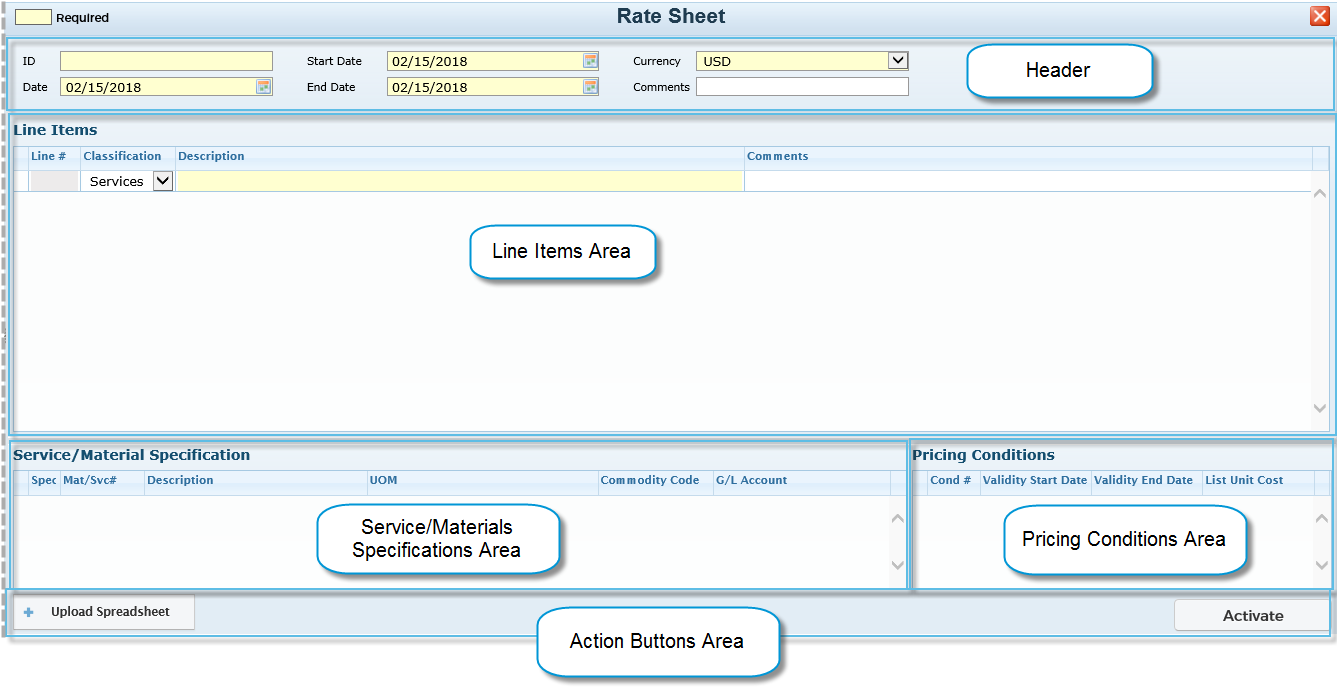
The following image shows the Rate Sheet form and it's main elements:
|
note |
You are able to configure the view of your Rate Sheet by clicking on the arrows contained in the borders of each area within the form to hide or view those areas. The view settings only apply to the current Rate Sheet you are working in and will be lost when the Rate Sheet form is closed. |
Header Fields
The header of the Rate Sheet form contains general details that pertain to the entire Rate Sheet. The header consists of the following fields:
- RS ID – the Rate Sheet ID. This is a mandatory field and has a maximum limit of ten (10) alphanumeric characters.
- RS Date – the Rate Sheet creation date.
- RS Start Date – the start date of the Rate Sheet validity.
- RS End Date – the end date of the Rate Sheet validity.
- Comments – comments pertaining to this Rate Sheet.
- Currency – the currency used for the Rate Sheet list prices.
Line Item Fields
The Rate Sheet Line Items area contains the line item numbers within that Rate Sheet. The line items area consists of the following fields:
- Line # - the Rate Sheet line number for this item in increments of 10.
- Category – the item category: S for Services and M for Materials.
- Description – the description of the item.
- Comments – any comments pertaining to the item.
Service/Material Specification Fields
The Rate Sheet Service/Material Specification area contains the specifications for the Rate Sheet line selected in the Line Items area above. These are the actual item details that are added to an Invoice as Line Items.
The Service/Material Specification area consists of the following fields:
- Spec # - the Service/Material Specification line number in increments of 10.
- Mat/Svc # - e the material or service code number.
- Description – a short, detailed description of the item. This will be the description that transfers to the Line Item field on your documents.
- UOM – Unit of Measure code associated with the item being quantified.
- Commodity Code – the UNSPSC commodity code for that item, if applicable.
- G/L Account – the GL account information for that item, if applicable.
Pricing Conditions Fields
The Rate Sheet Pricing Conditions area contains the conditions for the item selected in the Service/Material Specification area. This area contains pricing information for that item.
The fields you are able to enter in the Service/Material Specification area are:
- Cond # - the pricing condition number in increments of 10.
- Validity Start Date – the start date for the validity of this pricing condition.
- Validity End Date – enter the end date for the validity of this pricing condition.
|
note |
When creating a Rate Sheet, ensure that the validity dates for your pricing conditions are within the overall Rate Sheet start and end dates or your Rate Sheet will not successfully activate. |